
IT teams have a tremendous responsibility to gather, prepare, store, and distribute devices. We previously discussed the strategic way to store devices for extended periods—but how do IT teams effectively distribute devices?
While proper storage is very important, distributing the devices is just as vital, as it involves a large amount of organization, preparation, and time. Device distribution has many variables, including the level of involvement for teachers, students, and parents/guardians.
Device distribution can be a stressful process, but with proper preparation and planning, it can be done efficiently and accurately. Read on to see our recommendations for distribution best practices.
How to Manage Distribution of Student Devices
Managing the distribution of student devices first starts when the school year is coming to an end and devices are prepared for extended storage. Creating a comprehensive device distribution plan is crucial, as this plan will serve as the blueprint for teachers, students, and staff alike.
The following is a list of items that must be planned, organized, and communicated for optimal device distribution:
- Preparing devices
- Defining distribution dates, times, and roles
- Planning the distribution event
- Creating device agreements and rules
- Developing tech support processes
- Providing distribution training
- Training distribution volunteers
Device Distribution Checklist
Having a smooth distribution process is enormously reliant on pre-distribution planning, but don’t worry—we’ve created a strategy to help tackle your device deployment before the first day of school rolls around.
Here are 10 questions to ask for a successful device distribution:
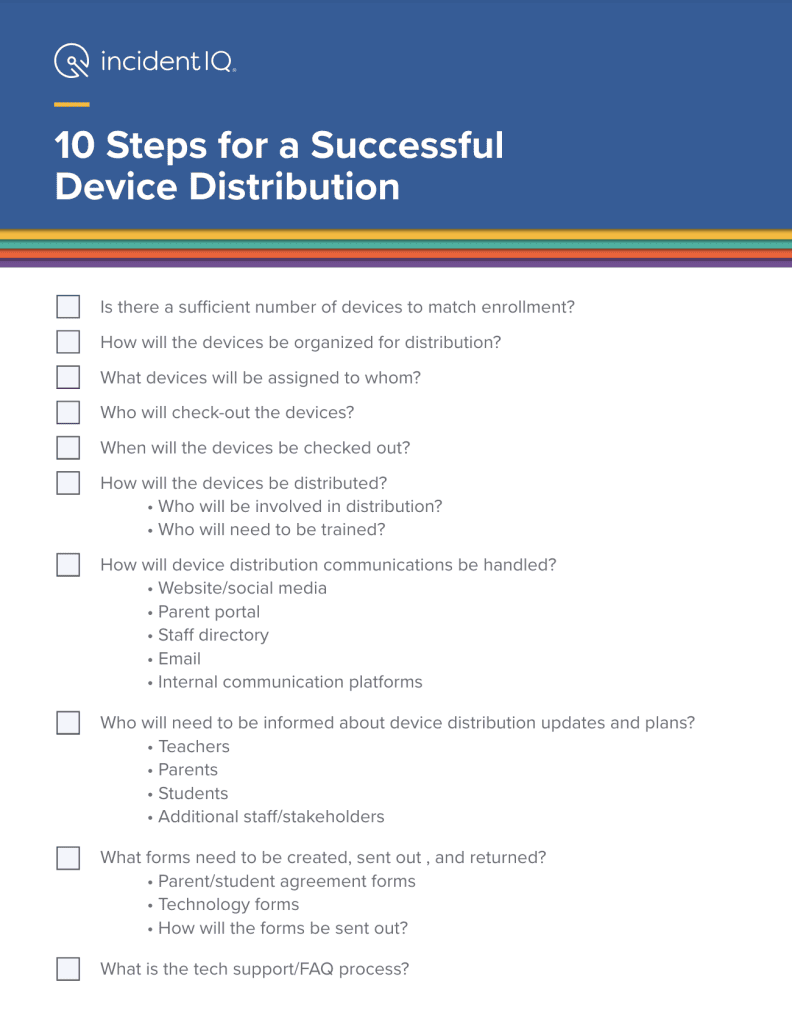
After the initial decisions are made, you’ll be able to see which questions need more specific answers.
For example, event planning for distribution day will involve more than a simple date. It will need a complete breakdown of schedules, check-out forms, and event communications—not to mention readying the devices themselves.
In the next few sections, we’ll break down device distribution steps further.
Prepare Devices for Distribution
Each device should be tagged with a unique asset tag for inventory and assignment purposes. Ideally, asset tags are applied shortly after receiving the device post-purchase. This can be done in-house, or through third-party device deployment specialists.
Once devices have been tagged, your IT team will want to make sure devices are properly charged for distribution. If your district’s Chromebooks have been in long storage for the summer, you’ll want to prepare them for distribution by charging devices before distribution. We suggest charging Chromebooks enough to let students and staff log in after assigning the device, which can help resolve technical issues before the first day of school.
Select Specific Pick-Up Dates, Timeframe, and Locations
Let’s examine our options for the best time to distribute devices.
Device distribution doesn’t just cover student devices—it also includes deploying the devices for teachers and staff. To make distribution easier, we recommend holding two separate distribution periods—one for teachers, and one for students.
For teacher devices, this may include their personal school laptop, as well as laptop charging carts for classroom use. We recommend holding two half days for teacher device distribution before school starts, ideally during teacher planning sessions. This is an ideal time because all of the teachers will be in the building, but students won’t be back in class yet.
For students, it’s best to distribute devices at the school’s open house, since both students and parents will be there. This gives parents and students the opportunity to sign the required paperwork, if they did not complete it beforehand, and to ask questions about their assigned devices. It’s also important to consider the best place to distribute devices. Optimally, the best place to hold distribution is near the open house sign-in so that everyone has the opportunity to see where the device distribution is, and can easily go ahead and check-out the device.
Identify Who Will Staff Distribution Tables
When planning device distribution day, don’t forget about human resources. If your IT team is large enough that no extra support is needed, that’s great. However, if your IT team is not large enough, extra help will need to be recruited before distribution day.
Incident IQ’s Rollout Scout makes it easy for teachers and non-IT staff to help deploy student devices with two quick scans of a student ID and an asset tag. What’s more, IT teams don’t have to worry about teachers doing more in the system than deploying devices—Rollout Scout enables instant device assignment without giving away full agent permission, so district data remains secure during distribution.
Identify Who is Authorized to Pick Up Devices
Legally, students under the age of 18 must have a parent/guardian sign forms in order to check out a device at pick-up. That’s why it’s best to hold device distribution at the open house, since both the student and parent will likely be present.
However, it’s also a best practice to send all device policies and forms electronically before distribution day. That way, students and parents who cannot physically attend open house will still have a way to receive student devices in the first week of school, provided that they complete device paperwork beforehand.
Create and Finalize Device Agreements
Who receives technology agreement forms to sign and return will vary, depending on the individual school district.
Multiple different forms should be created for all scenarios, from agreement forms for teachers, remote learners, IEP students, and so on. This will ensure that liability to the school is properly protected in all situations.
Creating these forms should be completed as soon as the end-of-year extended storage process is complete. Individual School Board decisions over device access will influence device distribution, and therefore influence the immediate creation of agreement forms. For example, if the School Board decides to have classroom-dedicated devices and rules against mobile student devices, IT teams will not need to plan for a device distribution day among students.
Develop the Device Distribution Communication Flow
While it may seem like common sense to know what information to communicate for device distribution, we created a useful checklist to use when you draft your message.
Information to include:
- Event time, date, and location
- Who can pick up the devices
- Device agreements or other paperwork required for pickup
- Either make the form returnable in advance or manually in person
- FAQs
There’s More To Asset Management than Distribution
Effectively coordinating device distribution is a tall order to fill for IT teams, but proper strategies and asset management software can greatly assist in this matter. Incident IQ strives to help K-12 IT teams through asset management software that can track, audit, and manage devices and relevant acceptable use policies throughout the school year.
If you’re looking for better tools to streamline K-12 asset management, reach out to us to see what Incident IQ can do for your district.